Here’s a statement you’ll hear in almost every JavaScript interview:
JavaScript is a single-threaded language that can be non-blocking.
What does that actually mean? Why does it matter? And how does JavaScript do anything useful if it can only do one thing at a time?
That’s what this is about.
What does asynchronous mean?
When you build a modern website, you don’t have all the data upfront. The HTML loads, the CSS loads, some JavaScript runs — but meanwhile, the page also needs to fetch data from a database, call a third-party API, load images.
That data isn’t there yet. You need to go get it.
Asynchronous means: we don’t have this right now, but we’re going to ask for it, and when it arrives, we’ll deal with it.
You’re telling JavaScript: “Hey, go find this for me. When you’re done, come back and let me know.”
JavaScript itself has no concept of the internet. It’s a programming language — it has no idea what a network request is. But the browser does. Node.js does. These environments give JavaScript the ability to kick off tasks and handle the results when they’re ready.
The JavaScript engine: memory heap and call stack
Before anything async makes sense, you need to understand what the JavaScript engine actually is.
Every browser runs a JavaScript engine. Chrome and Node.js use V8, written in C++. The engine has two components:
Memory heap — where memory allocation happens. Every variable, every object, every function you create lives here.
Call stack — where your code is read and executed. It tracks where you are in the program.
const a = 1; // allocated in the memory heap
const b = 100;
const c = 10;
These variables sit in the memory heap for the duration of the program. Leave too many large objects there and you have a memory leak — unused data filling up a finite space until the browser can’t work.
Global variables are particularly dangerous for this reason. If you forget to clean up, they stay in memory forever.
The call stack
The call stack is last-in, first-out. Whatever gets pushed on top runs first.
console.log(1);
console.log(2);
console.log(3);
// 1, 2, 3
Simple enough. But with function calls, it gets more interesting:
function two() {
  console.log(4);
}

function one() {
  two();
}

one();
What happens on the call stack:
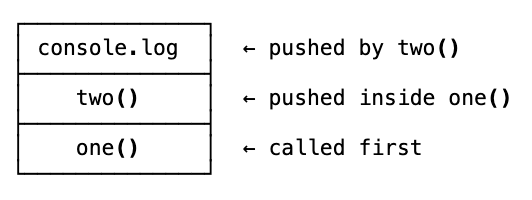
one() gets pushed. Inside it, two() gets pushed. Inside that, console.log gets pushed. It runs, logs 4, pops off. two() pops. one() pops. Stack is empty.
Stack overflow
What happens if a function calls itself forever?
function foo() {
  foo();
}

foo();
foo gets pushed. It calls foo, which gets pushed. Which calls foo, which gets pushed. Over and over and over.
Maximum call stack size exceeded.
Stack overflow. The site name makes more sense now.
This is recursion — a function calling itself. Recursion is a valid technique, but it always needs a base case. Without one, the stack fills up and the browser kills it.
Single-threaded: one thing at a time
JavaScript has one call stack. One. It can only do one thing at a time.
That’s what single-threaded means. One thread of execution, one statement at a time.
Other languages can have multiple threads running simultaneously — that’s multithreaded. JavaScript was intentionally kept single-threaded to avoid the complexity that comes with it. Multithreaded environments have problems like deadlocks — two threads each waiting for the other to release a resource, locked in a standoff forever.
With one thread, you don’t have that problem. One thing runs, finishes, then the next thing runs.
This is synchronous programming — line 1 executes, line 2 starts only after line 1 finishes.
The blocking problem
Single-threaded creates one big problem.
What if line 2 takes a really long time?
console.log(1);
// some massive operation that takes 5 seconds
loopThroughMillionsOfItems();
console.log(3);
Line 1 logs. The massive operation blocks the stack for 5 seconds. Line 3 waits. The user can’t interact with anything. The page freezes.
Think of it like a buffet. Everyone’s waiting to eat, but Bobby keeps piling bacon on his plate and nobody else can get through.
That’s synchronous blocking. Not good.
Asynchronous to the rescue
Asynchronous code is the solution. Instead of blocking the stack while something slow runs, you hand it off — let it happen in the background — and continue with the rest of the program. When it’s done, it comes back.
console.log(1);

setTimeout(() => console.log(2), 2000);

console.log(3);

// Output: 1, 3, 2
You’d expect 1, 2, 3. You get 1, 3, 2.
Line 1 runs. setTimeout gets handed off somewhere. Line 3 runs. Two seconds later, 2 appears.
You’ve just witnessed asynchronous programming. But how?
The JavaScript runtime
The JavaScript engine — memory heap and call stack — is only part of the picture.
To run in a browser, you have the JavaScript runtime, which is the engine plus extras the browser provides:
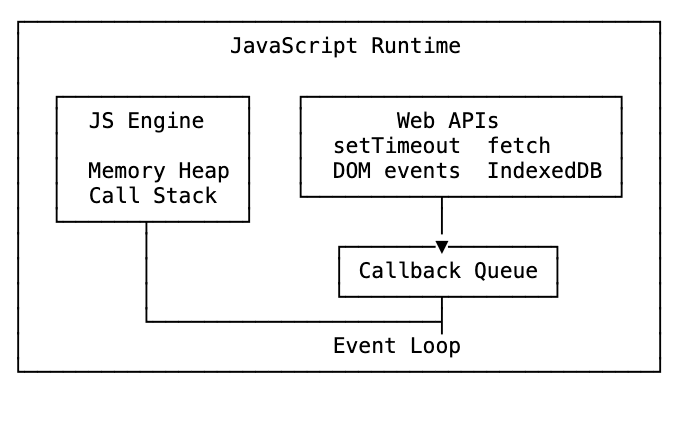
setTimeout, fetch, DOM event listeners — these aren’t JavaScript. They come from the browser. They’re Web APIs.
The event loop in action
Let’s trace exactly what happens with our setTimeout example:
console.log(1)goes on the call stack. Runs. Pops off.setTimeout(fn, 2000)goes on the call stack. But it’s a Web API — the call stack hands it to the browser and pops it immediately.- The browser starts a 2-second timer in the background.
console.log(3)goes on the call stack. Runs. Pops off. Stack is now empty.- 2 seconds pass. The timer fires. The browser puts the callback into the callback queue.
- The event loop checks: is the call stack empty? Yes. It takes the callback from the queue and pushes it onto the stack.
console.log(2)runs.
The event loop has one job: watch the call stack and the callback queue. When the stack is empty and the file has finished running, push whatever’s waiting in the queue.
What about setTimeout(0)?
console.log(1);
setTimeout(() => console.log(2), 0);
console.log(3);

// Still outputs: 1, 3, 2
Even at zero milliseconds, setTimeout goes through the Web API and callback queue. Zero delay doesn’t mean “right now” — it means “as soon as possible after everything else.”
The callback queue only gets its chance when the call stack is completely empty.
This is a classic interview question. Now you can explain exactly why.
Callbacks
This async pattern — “do something, then call this function when you’re done” — is a callback.
element.addEventListener("click", submitForm);
// "When the user clicks, call submitForm"
That’s a callback. The Web API listens for the event, and when it fires, it puts submitForm in the callback queue.
Callbacks work. But they have a problem.
movePlayer(100, "Left", function () {
  movePlayer(400, "Left", function () {
    movePlayer(10, "Right", function () {
      movePlayer(330, "Left", function () {
        // ...
      });
    });
  });
});
Pyramid of doom. Nested callbacks, each depending on the previous. Hard to read. Hard to debug. Hard to error handle — you have to check for errors at every single level.
A more realistic example: fetching data from three different APIs, each depending on the last. With callbacks, you get a wall of nested code with error handling duplicated at every layer.
There had to be a better way.
Promises
Promises were introduced in ES6. A promise is an object that represents a value you’ll receive at some point in the future.
A promise can be in one of three states:
- Pending — the operation is still running
- Fulfilled — it completed successfully, you have a value
- Rejected — it failed, you have a reason
const promise = new Promise((resolve, reject) => {
  if (condition) {
    resolve("it worked");
  } else {
    reject("it broke");
  }
});
You create a promise with new Promise, passing a function that receives resolve and reject. Call resolve when the operation succeeds. Call reject when it fails.
Using a promise
promise
  .then((result) => console.log(result)) // 'it worked'
  .catch((err) => console.log(err)); // if it rejects
.then() receives the resolved value. .catch() catches any rejection or error thrown in the chain.
You can chain .then() calls — each one receives the return value of the previous:
promise
  .then((result) => result + "!") // 'it worked!'
  .then((result) => result + "?") // 'it worked!?'
  .then((result) => console.log(result)) // logs 'it worked!?'
  .catch((err) => console.log(err));
If anything in the chain throws or rejects, .catch() catches it. Any .then() calls after the .catch() still run unless they also fail.
Promise.all()
What if you need to make three API calls and use all three results?
const urls = [
  "https://jsonplaceholder.typicode.com/users",
  "https://jsonplaceholder.typicode.com/posts",
  "https://jsonplaceholder.typicode.com/albums",
];

Promise.all(urls.map((url) => fetch(url).then((res) => res.json())))
  .then(([users, posts, albums]) => {
    console.log(users);
    console.log(posts);
    console.log(albums);
  })
  .catch((err) => console.log("something failed", err));
Promise.all() takes an array of promises and runs them all simultaneously. It resolves when every promise resolves, returning all results as an array.
Important: if any single promise rejects, Promise.all() short-circuits and rejects immediately. One failure cancels the whole batch.
Async/await — syntactic sugar
ES8 brought async/await. Same functionality as promises. Different syntax. The goal: make async code look synchronous.
// With promises
fetch(url)
  .then((res) => res.json())
  .then((data) => console.log(data));

// With async/await
async function fetchData() {
  const res = await fetch(url);
  const data = await res.json();
  console.log(data);
}
Two rules:
- Declare a function with
asyncto useawaitinside it - Put
awaitin front of any expression that returns a promise — it pauses the function until the promise resolves, then continues
The function pauses at await. Everything else in your program keeps running. When the promise resolves, execution resumes from that line.
This is called syntactic sugar — it does the same thing underneath, just looks different.
Error handling with try/catch
With promises, errors are caught with .catch(). With async/await, you use try/catch:
async function getData() {
  try {
    const res = await fetch(url);
    const data = await res.json();
    console.log(data);
  } catch (err) {
    console.log("oops:", err);
  }
}
If anything inside the try block throws or rejects, execution jumps to catch. It’s the same pattern you’d use for synchronous errors — which is exactly the point of async/await.
Combining with Promise.all:
async function getData() {
  try {
    const [users, posts, albums] = await Promise.all(
      urls.map((url) => fetch(url).then((res) => res.json())),
    );
    console.log(users, posts, albums);
  } catch (err) {
    console.log("something failed:", err);
  }
}
ES2018: .finally()
Added in ES2018, .finally() runs after a promise settles — whether it resolved or rejected.
fetch(url)
  .then((res) => res.json())
  .then((data) => console.log(data))
  .catch((err) => console.log(err))
  .finally(() => console.log("done either way"));
.finally() doesn’t receive the resolved value or error. It just runs. Useful for cleanup — hiding a loading spinner, sending an analytics event, clearing a lock — regardless of whether the request succeeded.
ES2018: for await…of
for...of loops over synchronous iterables. for await...of loops over async iterables — arrays of promises.
async function getData() {
  const arrayOfPromises = urls.map((url) => fetch(url));

  for await (const request of arrayOfPromises) {
    const data = await request.json();
    console.log(data);
  }
}
Each iteration awaits the next promise before moving on. You get results one at a time, in order, with clean syntax.
The job queue — why promises beat setTimeout
Here’s where it gets interesting. Remember this:
setTimeout(() => console.log("one is the loneliest number"), 0);
setTimeout(() => console.log("two can be as bad as one"), 10);
Promise.resolve().then(() => console.log("hi"));
console.log("three is a crowd");
Output:
three is a crowd
hi
one is the loneliest number
two can be as bad as one
The promise runs before both setTimeouts — even the one with a zero delay. Why?
When promises were added to JavaScript in ES6, the event loop got a second queue: the job queue (also called the microtask queue).
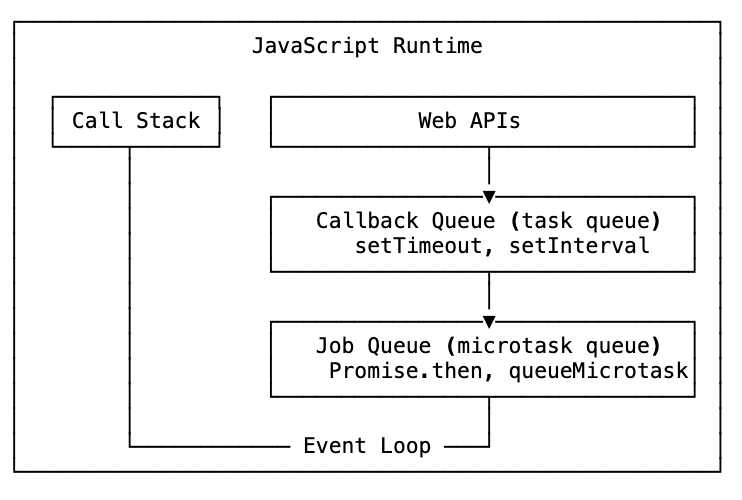
The job queue has higher priority than the callback queue. The event loop checks the job queue first, drains it completely, then checks the callback queue.
So when Promise.resolve().then(...) resolves, it goes to the job queue. The setTimeout callbacks go to the callback queue. Even with a zero delay, the promise wins because the event loop checks the job queue first.
This is why the order is: synchronous code → microtasks (promises) → tasks (setTimeout, etc.).
Parallel, sequential, race
When you have multiple async operations, you have three strategies. Choosing the right one matters for both correctness and performance.
Parallel
Run everything at the same time. Get all results when all finish.
async function parallel() {
  const [a, b, c] = await Promise.all([promiseA(), promiseB(), promiseC()]);
  return { a, b, c };
}
Use this when operations are independent. Fastest approach — all three run simultaneously.
Sequential
Run one at a time, in order. Each waits for the previous.
async function sequential() {
  const a = await promiseA();
  const b = await promiseB();
  const c = await promiseC();
  return { a, b, c };
}
Use this when each operation depends on the result of the previous, or when order matters and you can’t run them at the same time. Slowest — total time is the sum of all operations.
Race
Run everything simultaneously. Take whichever resolves first, ignore the rest.
async function race() {
  const first = await Promise.race([promiseA(), promiseB(), promiseC()]);
  return first;
}
Use this for timeouts, redundant requests, or when you want the fastest response and the others don’t matter.
Promise.allSettled() — ES2020
Promise.all() short-circuits on the first rejection. Sometimes you want all promises to run regardless of whether they succeed or fail.
const p1 = new Promise((resolve) => setTimeout(() => resolve("done"), 3000));
const p2 = new Promise((_, reject) => setTimeout(() => reject("failed"), 3000));

Promise.all([p1, p2]).catch((err) => console.log(err));
// 'failed' — short-circuits when p2 rejects

Promise.allSettled([p1, p2]).then((results) => console.log(results));
// [
//   { status: 'fulfilled', value: 'done' },
//   { status: 'rejected', reason: 'failed' }
// ]
Promise.allSettled() waits for every promise to finish — resolved or rejected — and gives you the status of each. Use it when you want a complete picture and don’t want one failure to cancel everything else.
Promise.any() — ES2021
Promise.race() resolves with the first settled promise — even if it rejects. Promise.any() resolves with the first fulfilled promise. Rejections are ignored unless all of them reject.
const p1 = new Promise((resolve) =>
  setTimeout(() => resolve("A"), Math.random() * 1000),
);
const p2 = new Promise((resolve) =>
  setTimeout(() => resolve("B"), Math.random() * 1000),
);
const p3 = new Promise((resolve) =>
  setTimeout(() => resolve("C"), Math.random() * 1000),
);

const result = await Promise.any([p1, p2, p3]);
console.log(result); // 'A', 'B', or 'C' — whichever resolves first
If all promises reject, Promise.any() throws an AggregateError.
Threads, concurrency, and parallelism
JavaScript is single-threaded. But we’ve been running fetch calls, timers, database queries in the “background” — where are those actually running?
They run in threads. Just not JavaScript’s thread.
When you call fetch, it’s a facade function — it looks like JavaScript, but underneath the hood it hands the request to the browser’s Web API. The browser runs that network request on its own background threads (often in C++), outside of JavaScript entirely. JavaScript never touches those threads directly.
Concurrency
JavaScript achieves concurrency through the event loop. One thread, but structured so that slow work gets handed off and the main thread never blocks.
The mental model: one person eating with two hands. You grab an apple with one hand, bring it to your mouth. While you chew, you grab a banana with the other hand. You’re not doing both at the same time — you have one mouth — but you can manage multiple things by switching between them.
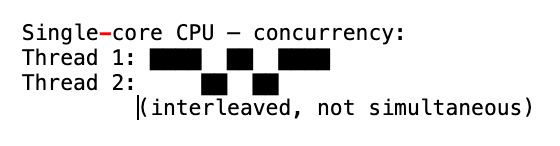
Parallelism
Parallelism is doing multiple things at exactly the same time on multiple processors.
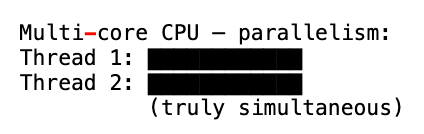
JavaScript can’t do this natively — one call stack, remember. But the environments it runs in can.
Web Workers
Browsers have Web Workers — JavaScript programs running on completely separate threads in parallel with the main thread.
const worker = new Worker("worker.js");
worker.postMessage("hello");

// In main thread:
worker.addEventListener("message", (event) => {
  console.log(event.data); // response from the worker
});
Web Workers can’t access the DOM or most browser APIs, but they can run heavy computations without blocking the UI. They communicate with the main thread by passing messages.
Node.js worker threads
In Node.js, when you read a file, query a database, or make a network request, libuv handles those on background threads. You don’t see it — it’s taken care of.
For CPU-intensive work, Node has worker_threads. And if you want true multi-process parallelism across CPU cores, Node lets you spawn child processes:
const { spawn } = require("child_process");
spawn("node", ["worker-process.js"]);
Each spawned process gets its own thread, its own V8 instance, its own call stack. Real parallelism.
The beauty of the single-threaded model
Parallelism sounds great in theory. In practice, it’s hard. When two threads touch the same data at the same time, you get race conditions, deadlocks, unpredictable bugs that are nearly impossible to reproduce.
JavaScript’s single-threaded model sidesteps all of that. One thread, clean code, async operations handled by the event loop. The restriction is what makes it manageable — and what made Node.js scale so well for I/O-bound workloads.
The complete picture
Put it all together. The JavaScript runtime — as it actually exists today — looks like this:
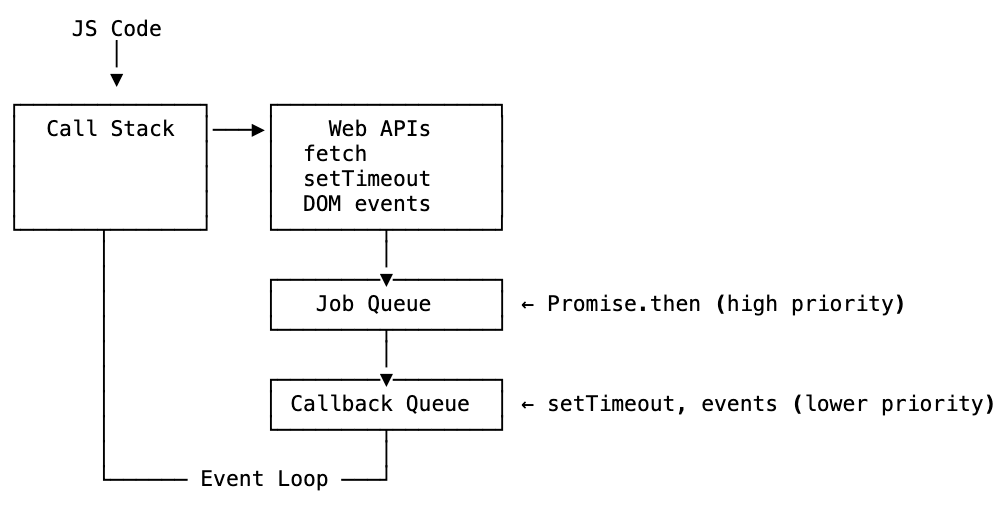
The event loop checks the job queue first — that’s why promise callbacks run before setTimeout callbacks. Then it checks the callback queue. Then back to waiting.
The short version
- Async means the data or result isn’t available yet — hand it off and handle it when it arrives
- The JavaScript engine has a memory heap (storage) and a call stack (execution tracker)
- JavaScript is single-threaded — one call stack, one thing at a time
- Blocking the stack blocks everything — the whole page freezes
- The JavaScript runtime adds Web APIs, a callback queue, and an event loop
- The event loop watches the call stack and queues — pushes callbacks when the stack is empty
- Callbacks are the original async pattern — function called when something finishes
- Pyramid of doom is what happens when callbacks nest too deep
- Promises represent a future value in three states: pending, fulfilled, rejected
.then()chains promise results —.catch()handles errors —.finally()runs regardlessPromise.all()runs promises in parallel; rejects if any rejectasync/awaitis syntactic sugar over promises — makes async code look synchronoustry/catchhandles errors in async/await functionsfor await...ofloops through async iterables- The job queue (microtask queue) has higher priority than the callback queue — promise callbacks run before setTimeout callbacks
- Parallel: all at once with
Promise.all(). Sequential: one at a time withawait. Race: fastest wins withPromise.race() Promise.allSettled()(ES2020) — runs all, reports each result regardless of rejectionPromise.any()(ES2021) — first to fulfill wins; throws only if all reject- Web Workers and Node worker threads enable actual parallelism, outside JavaScript’s main thread
- Concurrency is interleaving tasks on one processor. Parallelism is truly simultaneous execution on multiple processors