Most people think good programmers don’t have errors. If you’re skilled enough, the code just works.
That’s the wrong way to think about it.
There’s no such thing as a perfect program. Every serious application will encounter unexpected conditions — bad network responses, missing data, invalid input. The question isn’t whether errors happen. The question is what your program does when they do.
Stop thinking of errors as mistakes. Think of them as a feature — a mechanism for telling users and developers when something is wrong, and ideally, how to fix it.
Handling errors well is what separates code that survives contact with the real world from code that doesn’t.
The Error constructor
JavaScript has a native Error constructor. Capital E — it’s a constructor function, so you instantiate it with new.
new Error("oopsie");
This creates an error instance. But creating an instance doesn’t actually do anything. Nothing stops. Nothing breaks. The error object just sits there.
const myError = new Error("oopsie");
console.log(myError); // Error: oopsie — but nothing is thrown
To actually signal that something went wrong, you need to throw it.
The throw keyword
throw is what makes an error real.
throw new Error("something went wrong");
When the JavaScript engine encounters a throw statement, it stops executing the current function immediately. Control passes up the call stack — looking for something that can handle it.
You can throw anything — not just Error instances:
throw "a string"; // valid
throw true; // valid
throw Error; // the constructor itself (not an instance)
throw new Error("oops"); // the proper way
And once you throw, everything after it in that block is dead code:
throw new Error("stop");
console.log(4 + 3); // never reached
Three properties every error has
An Error instance comes with three built-in properties.
const myError = new Error("oopsie");

myError.name; // "Error"
myError.message; // "oopsie"
myError.stack; // full stack trace as a string
The stack property is the useful one. It shows you exactly where the error happened and what the call stack looked like at that moment.
function a() {
  const b = new Error("oops");
  return b;
}

a().stack;
// Error: oops
//   at a (<anonymous>:2:13)
//   at <anonymous>:1:1
If you had a function c calling a, the trace would show c → a → anonymous. You’re reading the call stack’s history — who called what and in what order. That’s what tells you who’s responsible for the error.
Built-in error types
JavaScript doesn’t just give you one generic error type. It has several specialised constructors you’ve probably already seen in the console:
new SyntaxError("unexpected token"); // JS couldn't parse the code
new ReferenceError("x is not defined"); // accessed something that doesn't exist
The engine throws these automatically. You don’t call throw — the engine does it for you the moment it detects the problem.
These are all subclasses of Error. Same three properties. Same propagation behaviour. They just have different names to tell you what category of problem occurred.
How errors propagate
When an error gets thrown, JavaScript walks up the call stack looking for something that can handle it.
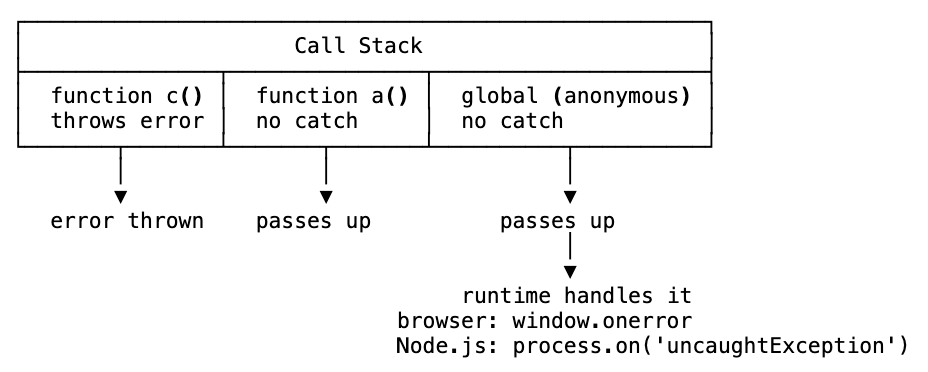
If nothing in your code catches the error, the runtime catches it as a last resort. In the browser, that’s the red error in the console. In Node.js, that’s process.on('uncaughtException').
Your program just ends. That’s not useful.
The goal is to create hurdles along the call stack — places that catch errors before they reach the bottom, so you can handle them and keep running.
try/catch/finally
try/catch is how you create those hurdles for synchronous code.
function fail() {
  try {
    console.log("this works");
    throw new Error("oopsie!");
    console.log("never reached");
  } catch (err) {
    console.log("caught:", err.message); // "caught: oopsie!"
  }
}
The try block runs line by line. If anything throws, execution jumps immediately to the catch block. Whatever was thrown arrives as the err parameter — the same Error object with name, message, and stack.
The catch block gives you access to all three:
catch (err) {
  err.name;    // "Error"
  err.message; // "oopsie!"
  err.stack;   // full trace
}
Add finally to run code no matter what — whether the try succeeded or the catch handled an error:
function fail() {
  try {
    throw new Error("oopsie!");
  } catch (err) {
    console.log("handled:", err.message);
  } finally {
    console.log("always runs");
    return "done";
  }
}

fail(); // "handled: oopsie!" then "always runs"
finally doesn’t care what happened. It runs after everything else, guaranteed.
Code after a throw doesn’t run
Inside a try block, once a throw is hit, the rest of the block is skipped:
try {
  throw new Error("stop");
  console.log("I will never run"); // dead code
} catch (err) {
  console.log("caught it");
}
This is intentional. Throwing means “something is wrong — stop doing what you were doing.”
Nested try/catch — re-throwing errors
You can nest try/catch blocks to handle errors at multiple levels of the call stack:
try {
  try {
    undeclaredFunction(); // throws ReferenceError
  } catch (err) {
    throw new Error(err.message); // re-throw up the chain
  }
} catch (err) {
  console.log("Got it:", err.message); // "Got it: undeclaredFunction is not defined"
}
The inner catch intercepts the error and re-throws it. The outer catch handles the re-thrown error. Each level of the stack gets a chance to decide what to do.
The big limitation: try/catch doesn’t catch async errors
Here’s the catch — and it’s a significant one.
try/catch only works with synchronous code. As soon as you introduce anything asynchronous, it breaks down.
try {
  setTimeout(() => {
    undeclaredVariable; // throws a ReferenceError
  }, 500);
} catch (err) {
  console.log("caught!"); // never runs
}
Why? Because setTimeout hands the callback to the Web API, which queues it on the callback queue. By the time that callback runs, the synchronous try/catch block has long since finished executing. The error has nobody to catch it.
This is one of the most common gotchas in JavaScript error handling.
Promise .catch() — handling async errors
For promises, you use the .catch() method instead of try/catch.
Promise.resolve("async fail")
  .then((response) => {
    throw new Error("number one, fail");
    return response; // never reached
  })
  .catch((err) => {
    console.log(err.message); // "number one, fail"
  });
When an error is thrown inside a .then() block, JavaScript walks down the promise chain looking for the nearest .catch(). Once found, the error is passed in and handled.
Silent failures — the most dangerous thing in async JavaScript
What happens if you throw an error in a promise and don’t have a .catch()?
Promise.resolve().then(() => {
  throw new Error("I failed");
});
// no .catch()
In a browser: nothing. Silence. The error swallows itself. Your code failed and you have no idea.
This is called a silent failure — and it’s extremely dangerous. A critical operation could have broken and your program keeps running as if nothing happened.
In Node.js, you get a warning:
UnhandledPromiseRejectionWarning: Error: I failed
Node is telling you: a promise rejected and you didn’t catch it. Add a .catch().
Always add .catch() to your promises. There’s no good reason not to.
Each promise needs its own .catch()
Nested promises are a common source of unhandled rejections. An outer .catch() doesn’t automatically cover an inner promise:
Promise.resolve()
  .then(() => {
    Promise.resolve() // inner promise — separate chain
      .then(() => {
        throw new Error("inner fail");
      });
    // ← missing .catch() here
  })
  .catch((err) => {
    // doesn't catch the inner promise's error
    console.log(err);
  });
Each promise chain is independent. You need a .catch() at each level:
Promise.resolve()
  .then(() => {
    Promise.resolve()
      .then(() => {
        throw new Error("inner fail");
      })
      .catch((err) => {
        console.log("inner caught:", err.message); // handled here
      });
  })
  .catch((err) => {
    console.log("outer caught:", err.message);
  });
async/await with try/catch
async/await is syntactic sugar over promises — and because it makes async code look synchronous, you can use try/catch with it again.
(async () => {
  try {
    await Promise.reject(new Error("oopsie"));
    console.log("is this still good?");
  } catch (err) {
    console.log(err.message); // "oopsie"
  }
  console.log("is this still good?"); // runs — it's after the try/catch
})();
The await keyword pauses the async function. If the awaited promise rejects, the rejection becomes a thrown error — which the try/catch can handle just like a synchronous throw.
Code after the try/catch still runs. Only code after the throw inside the try block is skipped.
The one gotcha: it’s easy to forget to wrap async/await code in try/catch. If you don’t, and the promise rejects, you’ll get the same UnhandledPromiseRejectionWarning from Node.js.
Custom error classes
The Error constructor is a class you can extend. This lets you create specialised error types with custom properties and names.
class AuthenticationError extends Error {
  constructor(message) {
    super(message); // call Error's constructor
    this.name = "AuthenticationError";
    this.favoriteSnack = "grapes"; // custom property
  }
}

throw new AuthenticationError("oopsie");
// AuthenticationError: oopsie
Now your errors have a meaningful name instead of the generic "Error". You can attach any properties you need — status codes, error codes, contextual data.
const a = new AuthenticationError("bad token");
a.favoriteSnack; // "grapes"
Practical custom errors: controlling what you reveal
Custom errors are especially useful in server-side code. You never want to send a full stack trace to a user — that exposes internal file paths, function names, and implementation details that bad actors can use.
class DatabaseError extends Error {
  constructor(message) {
    super(message);
    this.name = "DatabaseError";
  }
}

class PermissionError extends Error {
  constructor(message) {
    super(message);
    this.name = "PermissionError";
  }
}
With dedicated error classes, you control the message at the point of definition. Instead of relying on every developer on your team to remember to sanitise error messages before sending them to users, the error class handles it from one place.
You can check which type of error you’re dealing with using instanceof:
const a = new DatabaseError("connection refused");

a instanceof DatabaseError; // true
a instanceof Error; // true — it extends Error
This lets you handle different error types differently:
try {
  // something that might throw
} catch (err) {
  if (err instanceof DatabaseError) {
    // show generic "service unavailable" message
  } else if (err instanceof PermissionError) {
    // redirect to login
  } else {
    // unexpected — log it and rethrow
    throw err;
  }
}
The philosophy
Some errors will always slip through. SyntaxErrors and ReferenceErrors happen. Promises reject at unexpected times. You can’t catch everything.
But the goal isn’t to catch everything. The goal is to fail gracefully — to handle the errors you can anticipate, communicate them clearly, and keep your program predictable.
An unhandled error is a surprise. A handled error is a decision.
The more errors you handle deliberately, the more control you have over what your program does under pressure. That’s what makes code reliable at scale — not the absence of errors, but the presence of good error handling.
The short version
- Errors aren’t mistakes — they’re a feature for communicating problems and handling them gracefully
new Error("message")creates an error instance. It does nothing on its ownthrowactually signals the error — stops execution and walks up the call stack- You can throw anything: strings, booleans, Error instances, the Error constructor itself
- Three Error properties:
name,message,stack(the call stack at the time of the throw) - Built-in types:
Error,SyntaxError,ReferenceError— the engine throws these automatically try/catch/finally: synchronous error handling.catchreceives the thrown value.finallyalways runs- Code after a throw is never reached inside the
tryblock try/catchdoesn’t catch async errors — setTimeout callbacks run after the try/catch has finished- Promise
.catch(): the async equivalent. Always add one — missing it causes silent failures - Silent failures: promises that reject with no
.catch()fail invisibly — extremely dangerous UnhandledPromiseRejectionWarning: Node.js’s way of telling you a promise rejected without a handler- Each nested promise needs its own
.catch()— outer handlers don’t cover inner chains async/await+try/catch: because async/await looks synchronous,try/catchworks again- Custom error classes: extend
Errorto create named, specialised errors with custom properties instanceof: check which type of error you caught and handle each case differently- Fail gracefully: anticipate errors, handle them deliberately, and keep your program predictable