Think of a painter’s palette. Paint organised into separate compartments — different colours, different areas, all combined to create something bigger. Or a book divided into chapters. Each chapter self-contained, but together they form the whole thing.
That’s what modules are.
Code grouped together by purpose. Self-contained. Movable. Reusable. Removable without breaking everything else.
As applications grow, you can’t keep everything in your head. You can’t have one giant JavaScript file with thousands of lines. You need a way to split code into pieces — and a way for those pieces to talk to each other. That’s what modules solve.
The problem: global scope chaos
Programs are fundamentally about data — storing it, modifying it, passing it around. How you organise that data determines how maintainable your code is.
In a small script, function scope handles most of it. Functions can’t see each other’s internal variables. If you write a signIn function with a textField variable inside it, nothing outside that function can touch it. Clean.
But functions also need to share data. And the obvious solution — putting shared data on the global scope — creates problems as code grows.
// Shared data on the global scope
const user = { name: "Kim", active: true };

function signIn(user) {
  /* ... */
}
function isHuman(user) {
  /* ... */
}
Now anything can touch user. Any function in any file can read it, change it, delete it. You modify user.name in one place and something breaks three files over. That’s tight coupling — everything depending on everything else.
On top of that, the global scope has limited memory. Fill it with variables nobody’s cleaning up and you have memory leaks. Global variables are bad because they never go away unless you explicitly remove them.
Multiple script tags don’t help
The obvious next thought: split the code into separate files.
<script src="script1.js"></script>
<script src="script2.js"></script>
<script src="script3.js"></script>
Here’s the problem. The browser doesn’t care that you put code in separate files. It evaluates all the scripts in sequence and combines them into one shared global scope. Any variable declared at the top level of any script is a global variable — for everything.
// script1.js
function fight(char1, char2) {
  const attack1 = Math.floor(Math.random() * char1.length);
  const attack2 = Math.floor(Math.random() * char2.length);
  return attack1 > attack2 ? char1 : char2;
}

// script2.js — comes after
var fight = "haha"; // just wiped out script1's function
If script2.js happens to use the same variable name, it silently overwrites whatever came before. And the order of your script tags becomes load-bearing — if something depends on a variable defined in a later script, it breaks.
Dependencies between scripts are implicit. Nobody says what depends on what. You just hope things are in the right order.
The module pattern
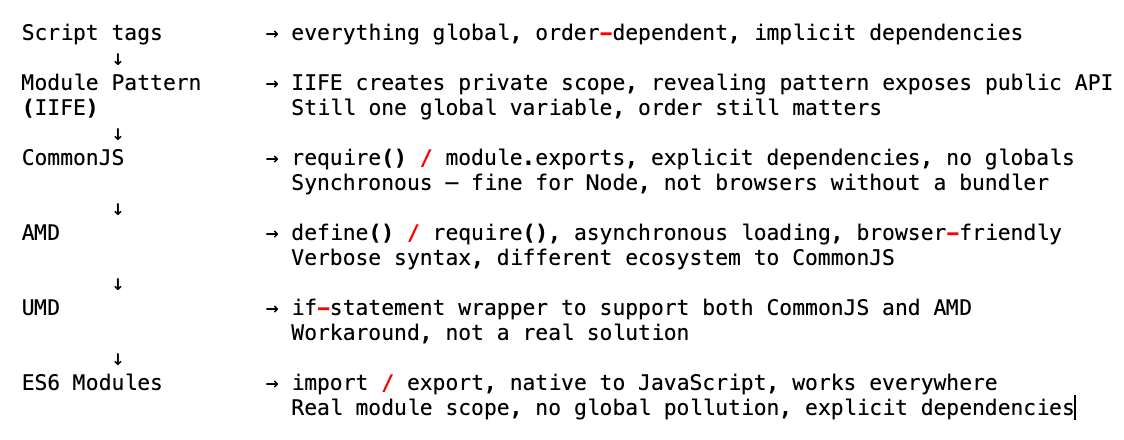
JavaScript didn’t have a native module system. So developers got clever and built one using what they had: closure and IIFEs.
An IIFE — immediately invoked function expression — is a function that runs immediately when defined.
(function () {
  // everything in here is private
})();
The wrapping parentheses prevent it from being a function declaration. The () at the end calls it immediately. Whatever’s inside has its own function scope — it doesn’t leak into the global scope.
Wrap an entire file in an IIFE and you’ve created a module scope. All the code runs, but none of the variables escape.
var fightModule = (function () {
  // private — nobody outside can touch these
  var harry = "Harry";
  var voldemort = "Voldemort";

  function fight(char1, char2) {
    var attack1 = Math.floor(Math.random() * char1.length);
    var attack2 = Math.floor(Math.random() * char2.length);
    return attack1 > attack2 ? char1 : char2;
  }

  // public — this is what we expose
  return {
    fight: fight,
  };
})();
harry and voldemort are private — nothing outside the IIFE can touch them. But fightModule.fight() is accessible — we returned it, so it becomes the public API.
This specific pattern — returning only what you want to expose — is called the revealing module pattern. You reveal exactly what you choose, and hide everything else.
Because of closure, even after the IIFE has run, the returned fight function still has access to harry and voldemort in its parent scope. Private variables, accessible only through the functions you choose to expose.
Importing into the module pattern
You could also be explicit about what external dependencies a module uses by passing them as arguments:
var myModule = (function ($, globalSecret) {
  // use $ and globalSecret as local variables
  // even if someone overwrites $ outside, it doesn't affect us in here
  $("h1").click(function () {
    $(this).hide();
  });
})(jQuery, globalSecret);
By passing jQuery as a parameter, you rename it locally to $. Even if something else changes jQuery on the global scope, your module has its own reference to it. You’re explicit: this module needs jQuery, and here’s what it calls it inside.
This makes dependencies visible. The function signature is a kind of manifest — here’s what this module depends on.
The module pattern’s limits
The module pattern was a genuine improvement. One global variable instead of many. Private internals. Explicit public API. Decoupled enough that teams could work on separate modules without stepping on each other.
But two problems remained.
Problem one: you still have a global variable. fightModule lives on the global scope. Two different scripts could still define a variable with the same name and one would win.
Problem two: order still matters. If myModule uses jQuery, the jQuery script has to load before myModule. Get it wrong and jQuery is not defined. On large projects with dozens of script tags, managing this order by hand was a real headache.
A better solution was needed.
CommonJS
As JavaScript moved to the server with Node.js, a proper module standard emerged: CommonJS.
// math.js — exporting
function fight(char1, char2) {
  const attack1 = Math.floor(Math.random() * char1.length);
  const attack2 = Math.floor(Math.random() * char2.length);
  return attack1 > attack2 ? char1 : char2;
}

module.exports = { fight };

// main.js — importing
const { fight } = require("./math");
fight("Harry", "Voldemort");
Clean syntax. No IIFEs. No manual dependency ordering. You say explicitly what you need with require, and what you expose with module.exports.
CommonJS solved both problems from the module pattern. Dependencies are declared explicitly. No global namespace pollution — nothing leaks unless you explicitly export it.
Node.js adopted CommonJS as its module system, and this is a huge part of why Node became so popular so fast. It also enabled NPM — the Node Package Manager. Developers could write CommonJS modules and publish them for anyone to use. require a package name, it’s available. This made code sharing across the JavaScript ecosystem incredibly easy.
The catch: CommonJS modules load synchronously. One loads, then the next, then the next. On a server that’s fine. On a browser — where users are clicking buttons, filling forms, scrolling — blocking the main thread while modules load is a serious problem.
Module bundlers: Browserify and Webpack
The solution to CommonJS’s synchronous limitation was module bundlers.
Tools like Browserify and Webpack do this: they read your code, understand require and module.exports, traverse every dependency, and bundle everything into one single JavaScript file.
# Browserify bundles everything into bundle.js
browserify script.js -o bundle.js
Now your index.html just loads one file:
<script src="bundle.js"></script>
The bundler figures out the dependency graph — which module needs which — and handles the order for you. The result is a single file where everything is already in scope when it needs to be.
This made CommonJS viable for browsers. And it introduced the pattern we still use today: write modular code, bundle for production.
AMD — Asynchronous Module Definition
While CommonJS was being adopted for the server, a different solution emerged specifically for browsers: AMD.
// AMD syntax
define(["jquery"], function ($) {
  function fight(char1, char2) {
    /* ... */
  }
  return { fight };
});
AMD was designed to load modules asynchronously — crucial for the browser. Instead of blocking while a module loads, it kicks off the load and continues. When the module arrives, the callback runs.
The main library that implemented AMD was RequireJS. Confusingly, CommonJS also uses the word require — just different syntax, different system. This naming collision was a sign of the fragmentation that had developed.
AMD solved the right problem for browsers but the syntax was verbose compared to CommonJS. Different developers, different teams, different preferences — the ecosystem split.
UMD — trying to bridge the gap
When you wanted to publish a package that worked in both Node (CommonJS) and the browser (AMD), you had to write it twice or use UMD — Universal Module Definition.
UMD is essentially an if statement that detects which module system the environment supports and adapts accordingly. It worked, but it was a sign of how broken things had become — writing boilerplate just to handle the lack of a standard.
The JavaScript community needed to agree on one thing.
ES6 modules — the native solution
ES6 finally gave JavaScript a native module system. Built into the language. No IIFEs, no require, no define. Just import and export.
// fight.js
const harry = "Harry"; // private — not exported
const voldemort = "Voldemort"; // private

export function fight(char1, char2) {
  const attack1 = Math.floor(Math.random() * char1.length);
  const attack2 = Math.floor(Math.random() * char2.length);
  return attack1 > attack2 ? char1 : char2;
}
// main.js
import { fight } from "./fight.js";

fight("Harry", "Voldemort");
harry and voldemort don’t need to be returned, wrapped, or hidden — they’re just not exported. Anything not exported is private to that file. No IIFEs needed.
Named exports vs default exports
ES6 modules have two export styles.
Named exports — export specific things by name. You can have as many as you want.
// Multiple named exports
export function fight(char1, char2) {
  /* ... */
}
export function jump(char) {
  /* ... */
}
export const MAX_HEALTH = 100;
Import them with curly braces, using the exact names:
import { fight, jump, MAX_HEALTH } from "./fight.js";
Default exports — one per file, imported without curly braces.
// Default export — one per module
export default function fight(char1, char2) {
  /* ... */
}
// No curly braces, can be named anything
import myFightFunction from "./fight.js";
You can mix both in the same file:
export default function fight(char1, char2) {
  /* ... */
}
export function jump(char) {
  /* ... */
}
import fight, { jump } from "./fight.js"; // default + named
Using ES6 modules in the browser
One important difference from regular scripts: the browser needs to know it’s dealing with a module.
<!-- This is a module, not a plain script -->
<script type="module" src="main.js"></script>
The type="module" attribute tells the browser to treat the file as an ES6 module — which changes a few things:
- Each module has its own scope. Nothing leaks to the global scope by default.
- Modules are deferred by default — they don’t block parsing.
- They must be served from an HTTP server (not opened as a local
file://URL) because of CORS restrictions.
Open the browser console after loading an ES6 module and try accessing your exported functions as globals. You can’t. They don’t exist on window. The module scope is real — completely isolated from the global namespace.
The progression
Why modules matter at scale
At a small scale — a few functions, one developer — modules feel like ceremony. Just one file, why bother?
At real scale, they’re essential.
Reusability — write a function once, import it anywhere. No copying code across files.
Maintainability — when something breaks, you know exactly which module to look at. A bug in fight.js is in fight.js, not somewhere in a 5000-line global script.
Separation of concerns — each module owns one thing and does it well. Payment logic doesn’t live next to animation code.
Team isolation — a team of engineers can work on payment module and another team on analytics module. As long as the public API — the exports — stays consistent, neither team needs to know what the other is doing internally.
Third-party code — NPM. Millions of published packages, all using module syntax. import what you need, ignore the rest.
The short version
- Modules group related code together, keep it self-contained, and control what’s exposed
- The global scope problem: multiple script tags combine into one global scope — anything can overwrite anything
- Module pattern: wrap code in an IIFE, return only what you want public — the revealing module pattern
- CommonJS:
require()andmodule.exports, synchronous, Node.js native, enabled NPM - Browserify/Webpack: bundle CommonJS modules for the browser, handle dependency order automatically
- AMD: asynchronous module definition, browser-first, loaded via RequireJS
- UMD: a compatibility shim between CommonJS and AMD — a sign of fragmentation, not a real fix
- ES6 modules: native
importandexport, real module scope, no global leaks,type="module"in the script tag, must be served over HTTP - Named exports use curly braces, can have many per file. Default exports skip curly braces, one per file
- Modules enable reusability, maintainability, separation of concerns, and team-scale development